You can modify your registration data in the following ways:


ELECTRONIC IDENTITY FOR THE ADMINISTRATION
Modification of data
The modification of the mobile phone number associated with a user in the Cl@ve system is specially protected and can only be done through the Internet, accessing the electronic headquarters of the Tax Agency or from application Cl@ve for mobile devices, by electronic certificate or DNIe. Also through personation in a Cl@ve Registry office.
By electronic certificate or DNIe:
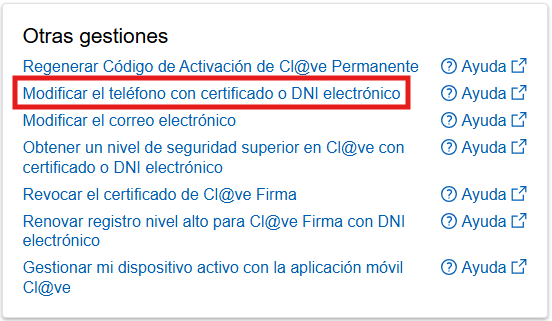
- Access the option "Other Procedures" - "Modify the phone with certificate or electronic DNi" within the Cl@ve Section of the Tax Agency.
- Choose your digital certificate.
- Modify the phone. Read and accept the conditions.
- You will receive the confirmation.
In person:
To change your phone number in person, it is essential to have the physical presence of the person who wants to change their number in one of the registration offices, as well as to come with their ID.
The network of registration offices throughout Spain operates as registration offices State Tax Administration Agency, of the Social Security Management and Common Services Entities, of the State Public Employment Service and the network of Information and Citizen Services offices of the Government Delegations and Sub-Delegations. Likewise, numerous Autonomous Communities and Local Entities have also enabled their networks of offices to carry out the processes of modification of the data provided in the accreditation of Cl@ve.
You can find the list of Registry Offices updated in the search engine of the General Access Portal.Mark the option ‘Cl@ve’ So that the offices that offer this service appear. Remember, too, that many offices require a prior appointment.
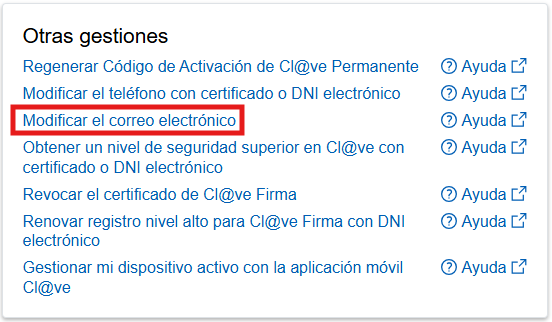
This option allows you to modify the email address that was provided in the registration. You can make this modification from the website of the Tax Agency or from the application "Cl@ve" for mobile devices.
- Go to "Electronic Identification > Cl@ve Móvil > All services > Other services > Change email address".
- You can log in using Cl@ve Móvil, a digital certificate or an e-ID.
- To log in with Cl@ve, click on “Cl@ve Móvil”. You will see the authentication request showing the details of the requesting body, the 5-minute timer (which is the request’s validity period), the verification code, and a prompt to open the app to scan the QR code and confirm the request. If you are unable to scan the QR code, click on the option “...continue with Cl@ve Móvil authentication without scanning the QR code”.
- Once the identification process is complete, you will be able to access the service. Change your email address and, after ticking the box “I have read and accepted the terms and conditions”, click on “Submit”. Your email address will be updated.
Through the website of the Tax Agency or from the application "Cl@ve" for mobile devices, you can access other procedures related to the registration in Cl@ve, for example:
- Regenerate Activation Code de Cl@ve Permanente
- Get a Superior security level in Cl@ve with certificate or electronic ID
- Revoke the Cl@ve Signature certificate
- Manage my active device with the Cl@ve PIN mobile app
- Renounce Cl@ve